Wallet Management
Withdraw
Send SOL or another available token from a Yodao wallet.
You can open Withdraw from the account menu under your profile and balance in the upper-right corner, or from the top of Portfolio.
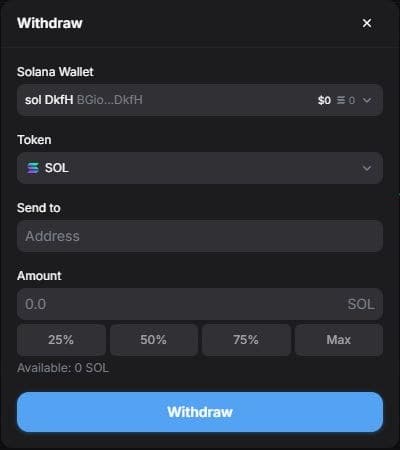
- In the Withdraw window, choose the source wallet under Solana Wallet.
- Under Token, select the asset you want to send. The form shows the available balance for the selected asset.
- Enter the destination's Solana address in Send to. Check that it belongs to the intended recipient and supports the selected token.
- Enter the Amount, or use a 25%, 50%, 75%, or Max shortcut. Review the wallet, token, address, amount, and any details shown by Yodao before submitting.
- Select Withdraw and follow the on-screen confirmation steps.
Transfers on Solana cannot generally be reversed after confirmation. If you need to add funds instead, see Deposit.