Export Private Key
Find the private-key control for a Yodao wallet and keep the key secure.
Each wallet has its own private key. To access the export control, open Portfolio, select Wallets above the balance summary, and find the wallet you want. Select Private Key on that wallet's row, then follow the on-screen steps to reveal or export its key.
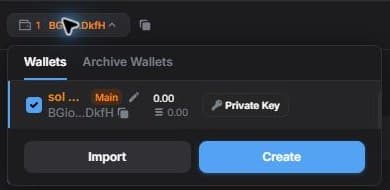
The Private Key action is also shown next to wallets in the Solana Wallet selector inside the Deposit and Withdraw windows. Check the wallet name and shortened public address before using it.
Keep the exported key in a secure place that only you can access. Anyone with the private key can control the wallet's funds. Never share it with support staff, in a chat, or in a screenshot. To receive a transfer, copy the wallet's public address instead; see Deposit.