Token Page
Token Chart
Chart controls, candles, indicators, and scales on a Yodao token page.
Open a token from Trenches, Search, or Discovery. The chart helps you inspect its price and market-cap movement. See Token Info for header metrics, holder data, and token activity; see Execution to place a trade.
Chart
The chart shows the token's price movement in real time and its price history.
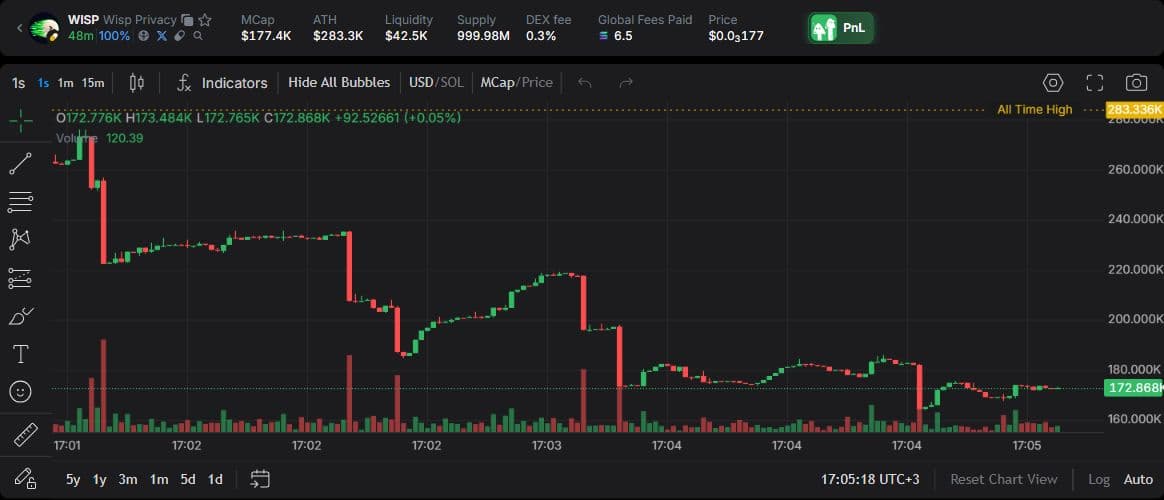
The top toolbar includes:
- Timeframes — the duration represented by one candle. Use the quick buttons or the interval menu.
- Candles — choose how the chart is displayed.
- Indicators — add chart indicators.
- Hide All Bubbles — hide or show bubbles on the chart.
- USD/SOL — change the display currency.
- MCap/Price — switch between market capitalization and token price.
- Settings, Fullscreen, and Screenshot — adjust the chart, expand it, or capture an image.
Tools for lines, levels, notes, and measurements appear on the left. Along the bottom, you can choose a period, turn on Log for a logarithmic scale, or use Auto for automatic scaling. If you move away from the latest candles, select Reset Chart View.