Token Info
Token metrics, trades, holders, and a guide to Token Info indicators.
The token page brings together headline metrics, trade history, holders, and developer activity. Open it from Trenches, Search, or Discovery. See Token Chart for chart controls and Execution for buying and selling.
Token header
At the top, you can see the token image, ticker, name, age, and bonding-curve progress. Nearby are a button to copy the contract address, a star to add the token to your watchlist, and links to the project's X account and website when available.
The header also shows these figures:
| Metric | Meaning |
|---|---|
| MCap | Current market capitalization. |
| ATH | Highest market capitalization the token has reached. |
| Liquidity | Liquidity in the trading pool. |
| Supply | Total token supply. The token shown in the screenshot has close to 1 billion tokens. |
| DEX fee | Trading-pool fee. |
| Global Fees Paid | Total fees paid for the token in SOL. This reflects activity by all traders, not just your trades. |
| Price | Current price of one token. |
Trades and wallet data
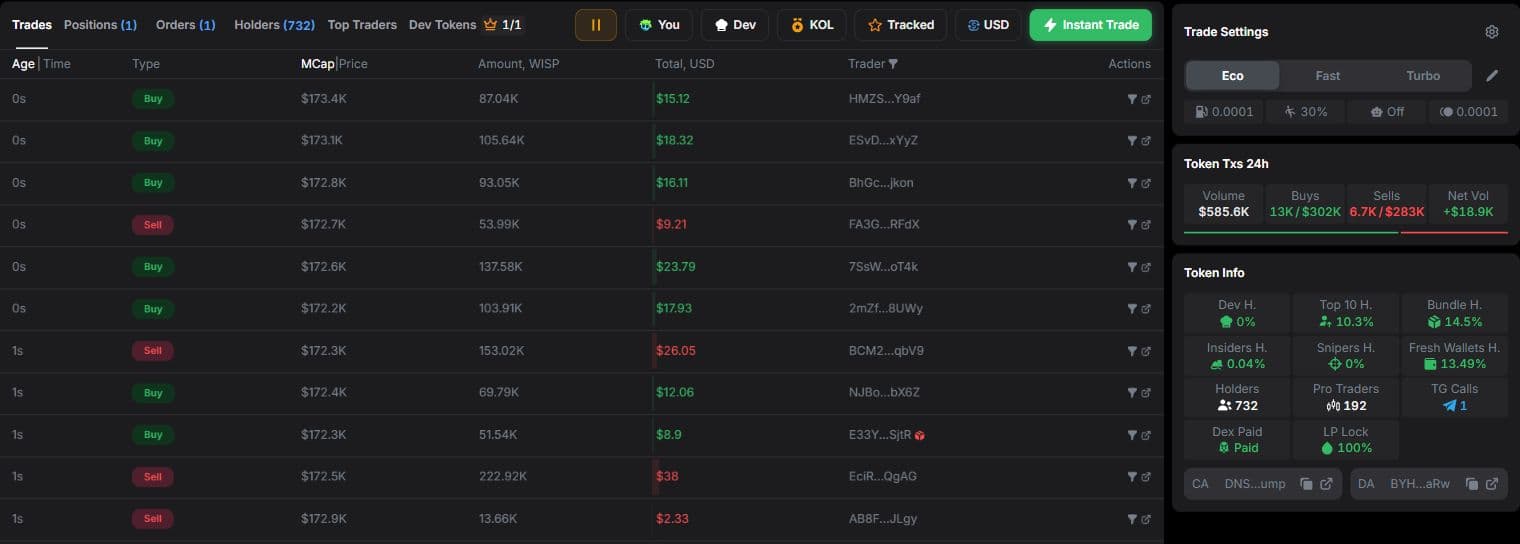
Trades
A feed of the token's buys and sells. Each row can show the time, trade type, market capitalization or price, token amount, total value, and trader wallet.
Filters above the table include:
- You — your trades.
- Dev — the developer's trades.
- KOL — trades by wallets Yodao marks as KOL.
- Tracked — trades by wallets you track.
Age/Time, MCap/Price, and USD/SOL change how values appear. The Trader filter narrows the feed by trader.
Holders
Explore who holds the token, how much they hold, what they have bought and sold, their average trade market capitalization, and their results.
| Column | What it shows |
|---|---|
| Wallet | Wallet address and available labels. |
| Balance | SOL balance in the wallet. |
| Bought / Sold (Avg MCap) | Purchases and sales with their average trade market capitalization. |
| Holding | Remaining token amount, value, and share of supply. |
| Funding | Available information about the wallet's funding source. |
| PnL | Wallet's profit or loss on the token. |
| Last Active | Time of the wallet's latest activity. |
Top Traders
This table lists token traders and their purchases, sales, remaining holdings, and PnL. Use it to see who has taken profit and who still holds the token.
Dev Tokens
The developer's launch history shows their other tokens, migration status, launch time, current and peak market capitalization, liquidity, and one-hour volume. It is a quick way to see what the developer launched before this token.
Funding: related wallets
When the Funding column contains data for a wallet, select it to see details:
- Shared Funding — wallets with a shared funding source.
- Time-linked Funding — wallets connected by the timing of their funding.
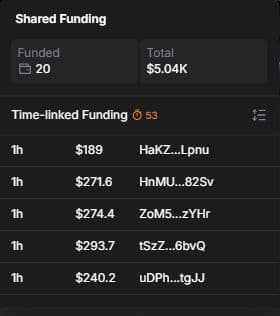
The panel displays available amounts, times, and related addresses. You can open the wallets in Solscan from there. A funding link alone does not establish that two wallets have the same owner.
Token Txs 24h
This block summarizes trading activity over the past 24 hours:
- Volume — total trading volume.
- Buys — number and volume of buys.
- Sells — number and volume of sells.
- Net Vol — the difference between buy and sell volume.
It offers a quick view of token activity without counting rows in the trade feed.
Token Info indicators
This block summarizes token distribution and additional indicators:
| Metric | Meaning |
|---|---|
| Dev H. | Share held by the developer. |
| Top 10 H. | Share held by the ten largest holders. |
| Bundle H. | Share held by bundle wallets. These wallets' purchases occur close together in the same block, which can indicate coordinated buying. |
| Insiders H. | Share held by insider wallets: addresses that received the token from another wallet instead of buying it. |
| Snipers H. | Share held by sniper wallets: wallets that bought the token in the same second as the developer (DEV). |
| Fresh Wallets H. | Share held by wallets less than one week old. |
| Holders | Number of token holders. |
| Pro Traders | Number of pro traders: users of trading terminals such as Axiom or GMGN. |
| TG Calls | Number of counted mentions of the token in Telegram groups. |
| Dex Paid | Dex Paid status. |
| LP Lock | Displayed share of locked liquidity. |
| CA | Token contract address. |
| DA | Developer address. |
Holding shares appear as percentages. CA and DA have copy buttons and links to Solscan.