Referral Program
Share your Yodao link, customize your code, and how levels work
Yodao gives you a referral link automatically when you create an account. Share it with someone who wants to join Yodao.
Find and share your referral link
- Sign in to Yodao and open Rewards in the top navigation.
- Select Share Referral Code. Yodao copies your referral link so you can paste it where you want to share it.
The link uses this format:
https://app.yodao.io/?referral_code=YOUR_CODEReplace YOUR_CODE with your own code. A new user can open the link or enter the code in the optional Referral code field during sign-up.
Change your code
Your code is assigned automatically, but you can choose a custom one:
- On Rewards, select Edit Code. This opens the Account window.
- Update the Username field and select Save.
- Use Share Referral Code again to copy the link with your updated code.
The account window currently asks for a unique username of 3–20 characters using letters, numbers, or underscores. Changing the username also changes the name shown on your profile, so check the result before sharing the new link.
Three referral levels
The referral diagram shows a three-level chain. A direct invite is Level 1; someone invited by that person is Level 2; and someone invited by your Level 2 referral is Level 3.
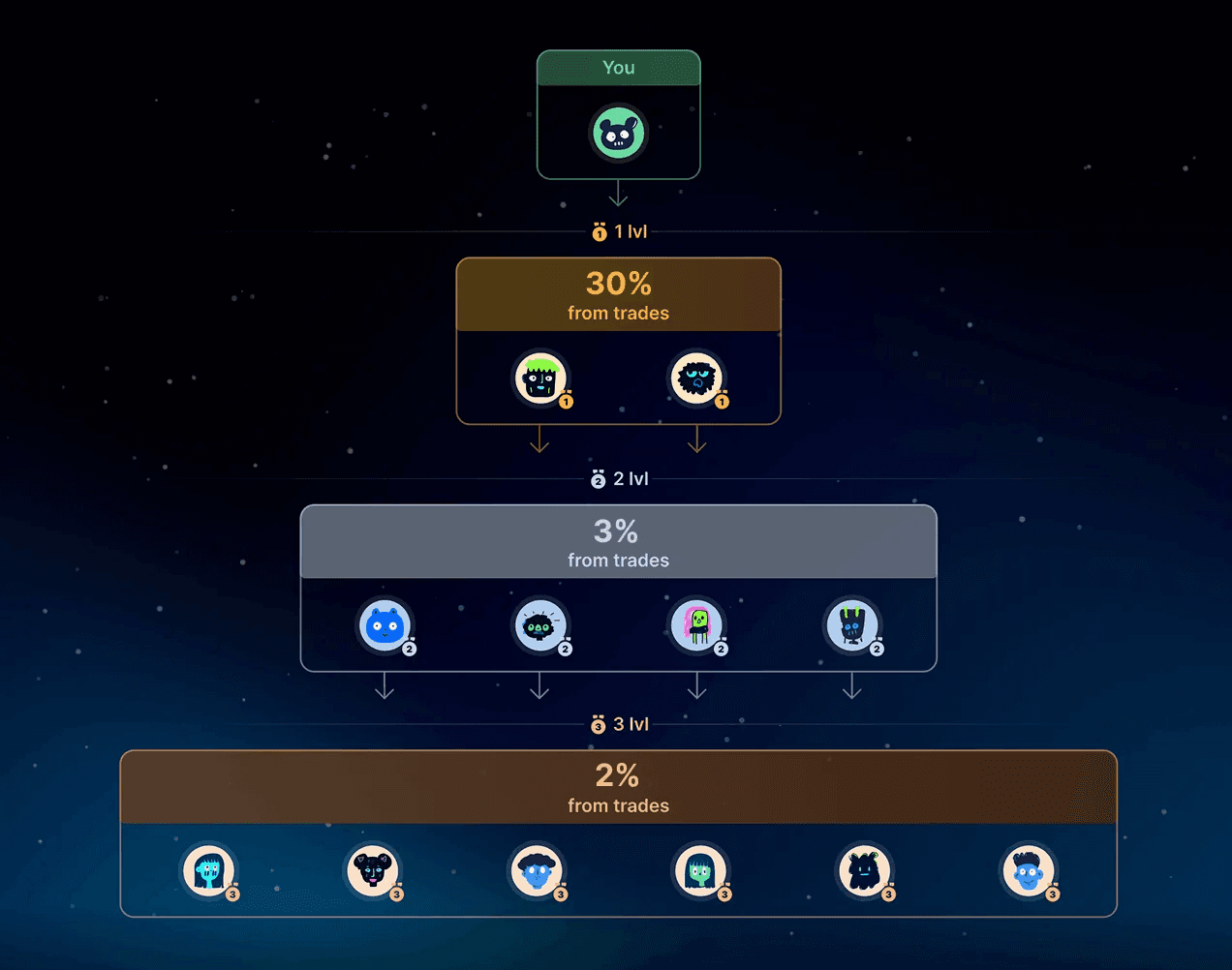
| Level | Relationship to you | Rate shown in the referral diagram |
|---|---|---|
| 1 — Direct | Someone joins using your link or code. | 30% ref. share from fees |
| 2 — Indirect | Your Level 1 referral invites someone. | 3% ref. share from fees |
| 3 — Extended | Your Level 2 referral invites someone. | 2% ref. share from fees |
How referral share is calculated
Referral share is calculated from the trading fee after the trader's cashback has been deducted. For the examples below, assume one trader makes $10,000 in trades, pays Yodao's 1% trading fee, and receives 20% cashback on that fee. The cashback rate is chosen for the example; actual cashback depends on the trader's Rewards rank.
| Calculation | Amount |
|---|---|
| Trading fee: $10,000 × 1% | $100 |
| Trader's cashback: $100 × 20% | $20 |
| Fee remaining after cashback: $100 − $20 | $80 |
Yodao receives $100 in trading fees in this example, returns $20 to the trader as cashback, and uses the remaining $80 as the base for referral share. The general calculation is trading fee × (1 − trader cashback rate) × referral rate. The referral rate depends on whether the trader is your Level 1, 2, or 3 referral.
Level 1: someone you invite directly (30%)
You share your link with User A, who joins Yodao as your direct referral. If User A makes the trades described above, your example reward is:
$80 × 30% = $24
Level 2: invited by your referral (3%)
User A shares their referral link with User B. User B joins through User A and becomes your Level 2 referral. If User B makes the same $10,000 in trades with a $100 fee and $20 cashback:
- You: $80 × 3% = $2.40.
- User A: User B is their direct referral, so $80 × 30% = $24.
Level 3: one more invitation in the chain (2%)
User B invites User C. User C is your Level 3 referral, User A's Level 2 referral, and User B's direct referral. If User C also makes $10,000 in trades with a $100 fee and $20 cashback:
- You: $80 × 2% = $1.60.
- User A: $80 × 3% = $2.40.
- User B: $80 × 30% = $24.
If Users A, B, and C each make the example trades independently, your rewards across all three are $24 + $2.40 + $1.60 = $28. This is a sum across three different traders, not three rates applied to one person's trades.
Benefit for the person you invite
The current Yodao sign-up window displays 10% fee cashback next to the referral-code field. A new user can open your link or enter your code during sign-up.
Track your referrals
Open Rewards to see Referral Cashback and the Referrals table. The table shows each referred person's join age, referral level, rank, trade volume, and referral cashback. Check the credited amounts in your own Rewards view.
The example uses a 20% trader cashback solely to show the calculation. Actual credited rewards and any applicable rates appear in Yodao's Rewards section.