Getting Started
Deposit
Add SOL to a Yodao wallet using its Solana address or QR code.
To start trading, send SOL to one of your Yodao wallets. You can open the Deposit window in either of these places:
- Select your profile and balance in the upper-right corner of Yodao, then choose Deposit from the account menu.
- Open Portfolio and select Deposit near the top of the page.
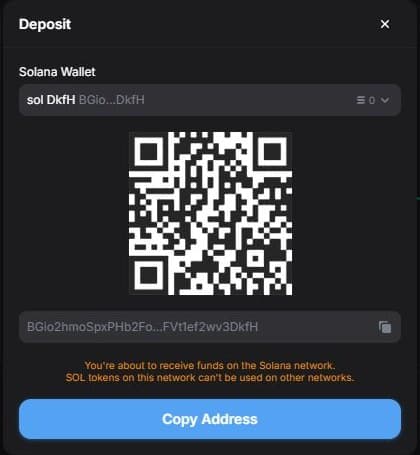
Get your deposit address
- In the Deposit window, select the wallet you want to fund from the Solana Wallet menu. If you have several wallets, check the wallet name and shortened address before continuing.
- Select Copy Address to copy that wallet's public address, or scan the QR code from your sending wallet.
- In the sending wallet or exchange, choose the Solana network and send SOL to the copied address. Check the full address and network before confirming the transfer there.
- Return to Yodao and check the wallet balance in Portfolio after the transfer is credited.
Use the public deposit address for receiving funds. The private key is secret and is never needed for a deposit. To move funds out later, see Withdraw.